Watt'n ditte?
War mal sowas wie n Blog, jetzt nur noch n Mausoleum.
05.02.2023 - Display icons with Xaphire Xfwm4 Pack (XFCE/XFWM4 Theme)⚓
 If you want to make that theme display application-icons in the title, just replace the original files with the ones from this archive (7z-Format, 3.0KiByte)). Better create a backup and stuff!
If you're a godlike, leet, professional haxor, you may just replace menu-active.xpm and menu-active.png and do the rest of the imagefiles with symlinks.
Changes I made
themerc
--button_layout=|HMC
++#button_layout=|HMC
++title_horizontal_offset=5
menu-active.xpm and menu-active.png
To display an icon, it is (AFAIK) necessary to replace the actual background with anything other than transparency. So I took the actual background that was used to the titlebar and made it matching for the icon-background.
I guess the no-icon-is-shown-if-bg-is-transparent is bugged behavior, because the theme is supposed to show an icon (show_app_icon=true) and a transparent background seems to be the logical way to go.
Things I tried (but failed):
- Using a solid color and making it the transparency-color
- Making the solid color (also the background) just a tiny bit transparent (tested a lot of values between 1 and ~80 %)
Things that may help you, if this needs to be reconfigured:
- The image size somehow determines the size of the application-icon in the titlebar.
- I got better results by putting the same content to menu-active.xpm and menu-active.png.
- The symlinks are also really helpful if you're experimenting with this, because you need to change less files.
- Switching themes in XFCE4's Window Manager (called styles there) reloads them from the drive instantly.
14.09.2022 - How to fix forced dark stuff in Thunderbird 102 (if you're using a theme) by modding the userChrome.css⚓
Did you update Thunderbird to 102 and menus, folder pane and stuff went dark/black if you're using themes? I guess, this is due a new and beloved feature introduced with Firefox 96.
How to fix mitigate:
- Create a userChrome.css in your profile and force Thunderbird to use it (use a searchengine of your choice to complete that)
- Place the following code into your userChrome.css (Thunderbird only reads that file on its startup):
/*Menupopup bg+text-colors:*/
menupopup, menupopup > menu, menuitem {
--panel-background: white !important;
color: black !important;
}

/*Menupopup bg+text-colors of disabled entries:*/
menupopup > menu[disabled="true"], menuitem[disabled="true"] {
color: grey !important;
}

/*bg-colors of folder pane, and mail-listings + mail-window:*/
#MsgHeadersToolbar, #composeContentBox *, .recipients-container *, .message-header-container, #attachmentBar, #attachmentList, #threadCols, #folder-pane-toolbar, #folderTree, #folderTree > treechildren::-moz-tree-row, #threadTree treechildren::-moz-tree-row {
background-color: white !important;
}

/*color of text-stuff:*/
#MsgHeadersToolbar, #composeContentBox *, .message-header-container, #attachmentBar, #attachmentList, #threadCols, #folder-pane-toolbar, treechildren::-moz-tree-cell-text() {
    color: black !important;
}

/*highlight/selection:*/
#threadTree treechildren::-moz-tree-row(selected) {
background-color: Highlight !important;
}
Hm, I wonder why I just started missing IE6. 🤔
Update: This just fixes mainwindow + mailwindow*, the other windows and dialogs are still wrong colored. :c
* For reasons I cannot understand, the reply-mailwindow uses different named ID-selectors and utterly ignores any background-color set for the mailtextfield (I tried even the body-tag and descendants).
Update 2: Setting browser.theme.toolbar-theme to "2" would be the way to go, but that will be overwritten by this great piece of software.
13.09.2022 - Disassemble HP 17-ca0202ng/ca0200ng⚓
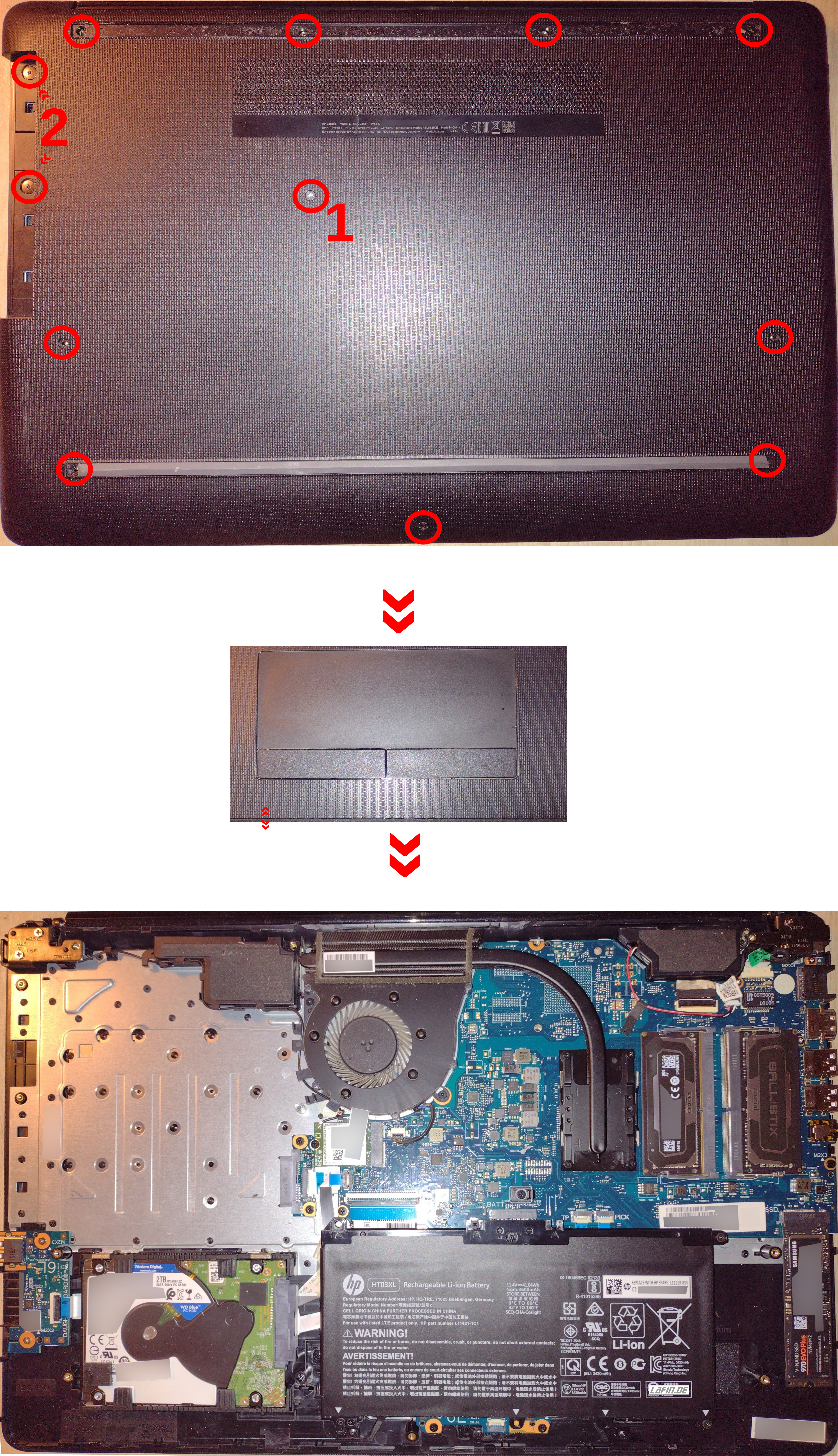

- Remove rubber base thingies (partitial on the lower one)
- Remove screws
- Screw (1) will loosen the optical drive, which has to be removed to get to screws (2)
- Turn around and open the display lid to get to the "keyboard-side" to carefully loosen the side plastic clips – However: I have no secure procedure for that, some of that high quality plastic stuff breaks every time :c
- If nothing is burning, it is done! At this level of disassembly...ness you can replace RAM, APU-heatpipe + fan, battery and the drives (SSD + HDD)

- Gummistreifen abziehen (beim Unteren nur die Enden notwendig)
- Schrauben raus
- Schraube (1) hält das optische Laufwerk, was rausgezogen werden muss, damit an an die Schrauben (2) heran kommt
- Umdrehen, Deckel aufklappen und die Plastik-Clips am Rand der Tastaturseite aufhebeln - Ich kann keinen Rat geben, wie man nichts von dem hochqualitativen Plastikzeugs einbüßt (es regnet jedes Mal ein paar Plastikschnipsel :c )
- Wenn nichts brennt, ist es vollbracht. Ohne Weiteres kommt man nun an den RAM, die APU-Heatpipe + Lüfter, Akku und die Laufwerke (SSD + HDD)
22.10.2022 - How to get device's name by using libpci::pci_lookup_name() with Free Pascal/Lazarus⚓
If you can't use file product_name in /sys/ you can try this (The code should explain itself (otherwise try this sample Lazarus-project, 64KiByte)):
function pci_lookup_name(pci_access: pointer;  buf: pchar; size, flags, vendor_id, device_id: integer): pchar; cdecl; external 'libpci' Name 'pci_lookup_name';
function pci_alloc(): pointer; cdecl; external 'libpci' Name 'pci_alloc';
function pci_init(a: pointer): integer; cdecl; external 'libpci' Name 'pci_init';

implementation
[…]
var
pci_access: pointer;
CharBuf: array[0..1023] of char;
i: int32;
YourString: string;
begin
pci_access := pci_alloc();
pci_init(pci_access);
YourString := StrPas(pci_lookup_name(pci_access, CharBuf, Length(CharBuf), 0, $1002, $73ff));
pci_cleanup(pci_access);
Flags documentation from pci.h:
enum pci_lookup_mode {
  PCI_LOOKUP_VENDOR = 1,		/* Vendor name (args: vendorID) */
  PCI_LOOKUP_DEVICE = 2,		/* Device name (args: vendorID, deviceID) */
  PCI_LOOKUP_CLASS = 4,			/* Device class (args: classID) */
  PCI_LOOKUP_SUBSYSTEM = 8,
  PCI_LOOKUP_PROGIF = 16,		/* Programming interface (args: classID, prog_if) */
  PCI_LOOKUP_NUMERIC = 0x10000,		/* Want only formatted numbers; default if access->numeric_ids is set */
  PCI_LOOKUP_NO_NUMBERS = 0x20000,	/* Return NULL if not found in the database; default is to print numerically */
  PCI_LOOKUP_MIXED = 0x40000,		/* Include both numbers and names */
  PCI_LOOKUP_NETWORK = 0x80000,		/* Try to resolve unknown ID's by DNS */
  PCI_LOOKUP_SKIP_LOCAL = 0x100000,	/* Do not consult local database */
  PCI_LOOKUP_CACHE = 0x200000,		/* Consult the local cache before using DNS */
  PCI_LOOKUP_REFRESH_CACHE = 0x400000,	/* Forget all previously cached entries, but still allow updating the cache */
  PCI_LOOKUP_NO_HWDB = 0x800000,	/* Do not ask udev's hwdb */
};
16.04.2020 - How to get Nvidia-GPU's utilization, clocks and other stats with Pascal/Lazarus in Linux ⚓
While using amdgpu, you're able to grab everything from /sys/class/drm/card[id]/device/, the (unfree) Nvidia-driver provides this informations by the library libnvidia-ml.so (NVML API Reference Guide).
The code should explain itself (otherwise try this sample Lazarus-project (7z-Format, 60KiByte)). Because Lazarus is a multiplattform IDE, this should work with other OSes, too (untested, just guessing).
If you don't want to "hardlink" (static linked) the library, read this: Loadlibrary - dynamically loading a dynamic library.
Software used:
- libnvidia-ml.so (440.82)
- Lazarus (2.0.6)
- Brain damaging drugs (all of 'em :/)
//declaration of static linked functions:
function nvmlInit(): integer; cdecl; external 'libnvidia-ml' name 'nvmlInit';
function nvmlShutdown(): integer; cdecl; external 'libnvidia-ml' name 'nvmlShutdown';

function nvmlDeviceGetHandleByPciBusId(pciBusId: PChar; nvmlDevice_t: PQWord): integer; cdecl; external 'libnvidia-ml' name 'nvmlDeviceGetHandleByPciBusId';
function nvmlDeviceGetClockInfo(nvmlDevice_t: QWord; nvmlClockType_t: QWord; clock: PQWord): integer; cdecl; external 'libnvidia-ml' name 'nvmlDeviceGetClockInfo';
function nvmlDeviceGetMaxClockInfo(nvmlDevice_t: QWord; nvmlClockType_t: QWord; clock: PQWord): integer; cdecl; external 'libnvidia-ml' name 'nvmlDeviceGetMaxClockInfo';
function nvmlDeviceGetUtilizationRates(nvmlDevice_t: QWord; nvmlUtilization_t: PQWord): integer; cdecl; external 'libnvidia-ml' name 'nvmlDeviceGetUtilizationRates';
function nvmlDeviceGetMemoryInfo(nvmlDevice_t: QWord; nvmlMemory_t: PQWord): integer; cdecl; external 'libnvidia-ml' name 'nvmlDeviceGetMemoryInfo';
function nvmlDeviceGetTemperature(nvmlDevice_t: QWord; nvmlTemperatureSensors_t: QWord; Temp: PQWord): integer; cdecl; external 'libnvidia-ml' name 'nvmlDeviceGetTemperature';
function nvmlDeviceGetPowerUsage(nvmlDevice_t: QWord; Power: PQWord): integer; cdecl; external 'libnvidia-ml' name 'nvmlDeviceGetPowerUsage';
function nvmlDeviceGetFanSpeed(nvmlDevice_t: QWord; Speed: PQWord): integer; cdecl; external 'libnvidia-ml' name 'nvmlDeviceGetFanSpeed';

//implementation:

procedure TForm1.Timer1Timer(Sender: TObject);
var
ResultValue: Word;
Device: QWord;
Return : integer;
UtilS: nvmlUtilization_Struct;
MemoryS: nvmlMemory_Struct;
PCIBusID: string;
begin
Memo1.Clear();
nvmlInit();
PCIBusID := '0000:01:00.0';  //found in /sys/class/drm/card[id]/device/uevent PCI_SLOT_NAME=0000:01:00.0
Return := nvmlDeviceGetHandleByPciBusId(PChar(PCIBusID), @Device);
Memo1.Lines.Add('nvmlDeviceGetHandleByPciBusId returned: ' + IntToStr(Return));
if (Return = 0) then
   begin
   //Utilization:
   Return := nvmlDeviceGetUtilizationRates(Device, @UtilS);
   Memo1.Lines.Add('nvmlDeviceGetUtilizationRates returned: ' + IntToStr(Return));
   Memo1.Lines.Add('gpu: ' + IntToStr(UtilS.GPU));
   Memo1.Lines.Add('mem: ' + IntToStr(UtilS.MEM));

   //Clocks:
   Return := nvmlDeviceGetClockInfo(Device, 0, @ResultValue);
   Memo1.Lines.Add('nvmlDeviceGetClockInfo 0 returned: ' + IntToStr(Return));
   Memo1.Lines.Add('GPU: ' + IntToStr(ResultValue));

   Return := nvmlDeviceGetClockInfo(Device, 2, @ResultValue);
   Memo1.Lines.Add('nvmlDeviceGetClockInfo 2 returned: ' + IntToStr(Return));
   Memo1.Lines.Add('MEM: ' + IntToStr(ResultValue));

   Return := nvmlDeviceGetMaxClockInfo(Device, 0, @ResultValue);
   Memo1.Lines.Add('nvmlDeviceGetMaxClockInfo 0 returned: ' + IntToStr(Return));
   Memo1.Lines.Add('Max GPU: ' + IntToStr(ResultValue));

   Return := nvmlDeviceGetMaxClockInfo(Device, 2, @ResultValue);
   Memo1.Lines.Add('nvmlDeviceGetMaxClockInfo 2 returned: ' + IntToStr(Return));
   Memo1.Lines.Add('Max MEM: ' + IntToStr(ResultValue));

   //Memory:
   Return := nvmlDeviceGetMemoryInfo(Device, @MemoryS);
   Memo1.Lines.Add('nvmlDeviceGetMemoryInfo returned: ' + IntToStr(Return));

   Memo1.Lines.Add('Free:' + IntToStr(MemoryS.Free));
   Memo1.Lines.Add('Total:' + IntToStr(MemoryS.Total));
   Memo1.Lines.Add('Used:' + IntToStr(MemoryS.Used));

   //Temperature:
   ResultValue := 0;
   Return := nvmlDeviceGetTemperature(Device, 0, @ResultValue);
   Memo1.Lines.Add('nvmlDeviceGetTemperature returned: ' + IntToStr(Return));
   Memo1.Lines.Add('Temp: ' + IntToStr(ResultValue));

   //Power:
   ResultValue := 0;
   Return := nvmlDeviceGetPowerUsage(Device, @ResultValue);
   Memo1.Lines.Add('nvmlDeviceGetPowerUsage returned: ' + IntToStr(Return));
   Memo1.Lines.Add('Power: ' + IntToStr(ResultValue));

   //Fans:
   ResultValue := 0;
   Return := nvmlDeviceGetFanSpeed(Device, @ResultValue);
   Memo1.Lines.Add('nvmlDeviceGetFanSpeed returned: ' + IntToStr(Return));
   Memo1.Lines.Add('Speed: ' + IntToStr(ResultValue));


   end;

nvmlShutdown();
end;
07.06.2020 - How to: Fix bugs without effort or competence⚓
- Use your genetic programming to create a bug
- Wait for an idiot, who is wasting his time to report this bug and also gives further hints for a fix
- Let the report rot until other idiots, which are dumb enough to use your faulty software, asks if and when the bug will be fixed
- Watch out: Don't be a noob and close the comments or ban the users violating your terms of use! You need to close the bug "because we don't need comments like the ones"
- Congratulations: Your code is better now
21.09.2016 - If you run into HDD kerfuffle, check optical drives!⚓
Every once in a while a pc of mine freezed in a time span from instant up to 2 hours after booting.
But if it not failed after booting, it could run for months non-stop without any issues.
Kernel log said:
kernel: [   90.085962] ata1: exception Emask 0x50 SAct 0x0 SErr 0x4090800 action 0xe frozen
kernel: [   90.085965] ata1: irq_stat 0x00400040, connection status changed
kernel: [   90.085966] ata1: SError: { HostInt PHYRdyChg 10B8B DevExch }
kernel: [   90.085969] ata1: hard resetting link
kernel: [   90.085976] ata2: exception Emask 0x50 SAct 0x0 SErr
kernel: [   90.085978] ata2: irq_stat 0x00400040, connection status changed
kernel: [   90.085980] ata2: SError: { HostInt PHYRdyChg 10B8B DevExch }
kernel: [   90.085983] ata2: hard resetting link
kernel: [   90.085999] ata4: exception Emask 0x50 SAct 0x0 SErr 0x4090800 action 0xe frozen
kernel: [   90.086000] ata4: irq_stat 0x00400040, connection status changed
kernel: [   90.086001] ata4: SError: { HostInt PHYRdyChg 10B8B DevExch }
kernel: [   90.086003] ata4: hard resetting link
Changed the HDD, switched kernels, disabled NCQ (libata.force=noncq), forced the BIOS to use IDE mode for all the devices: Failish behavior just slowed down/became more sporadic.
At the end I just unplugged the barely used optical drive and ta da: Everything was finy fine. So the optical drive made the other (hard) drives fail for some reason what so ever even without being actively used. It just was there and did evil.
Do something with computers, they said. They're not unlogical like humans, they said. >:(
Several years after this the mainboard's southbridge/chip for sata-stuff died, so it wasn't the fault of the optical drive(s), it was a faulty mainboard.
16.10.2015 - Extract version-numbers from Lazarus project files (.lpi) using bash⚓
Extracting is quite simple, 'cause Lazarus uses XML for the version-numbers so gathering the data is done by 4 simple lines of code. The remaining lines are for handling the extracted data, 'cause Lazarus removes the nodes if for example the major-version is 0 (which is smart, cause it saves data):
getversion.sh
#!/bin/bash
################################################################################################################
# Version 0.1.0.1
################################################################################################################

#excample of datastructure in lpi-files (xml):
#<MajorVersionNr Value="1"/>
#<MinorVersionNr Value="2"/>
#<RevisionNr Value="1"/>
#<BuildNr Value="75"/>

#Variables:
File=$1

if [ "$File" = "" ]; then #exit if empty parameter to fix "hang-bug"
  exit
fi

function ZeroIfEmpty #function returns 0 if parameter (which should be a version numer) is empty
{
if [ "$1" = "" ]; then
   echo 0
else
   echo $1
fi
}

#Gather the data:
Major=( $(grep -oP "<MajorVersionNr\ Value=(.*)" $File | cut -d '"' -f 2 | cut -d '"' -f 1) )
Minor=( $(grep -oP "<MinorVersionNr Value=(.*)" $File | cut -d '"' -f 2 | cut -d '"' -f 1) )
Revision=( $(grep -oP "<RevisionNr Value=(.*)" $File | cut -d '"' -f 2 | cut -d '"' -f 1) )
Build=( $(grep -oP "<BuildNr Value=(.*)" $File | cut -d '"' -f 2 | cut -d '"' -f 1) )

#Lazarus removes the nodes with versionnumbers, which are 0, so if we received empty values, we've to set them to 0:
Major=( $(ZeroIfEmpty $Major))
Minor=( $(ZeroIfEmpty $Minor))
Revision=( $(ZeroIfEmpty $Revision))
Build=( $(ZeroIfEmpty $Build))

#Output:
echo $Major.$Minor.$Revision.$Build
Using the script in your code is also very simple, for example writing the version to a file:
getversion.sh "$ProjectsLPI" > "$Versionfile"
$ProjectsLPI is the path to your project's lpi-file
$Versionfile is the file you want to get the version-numbers
Used software:
bash 4.3.30
grep 2.20
cut (GNU coreutils) 8.23
05.09.2015 - HTML2RSS⚓
Problem to solve: Create an RSS-feed on Linux.
Here's my path to the solution:
1. Have I done it before?
Kind of, but it isn't able to run on Linux, not even with wine Wine.
2. Can I port it?
Probably yes, but it would take a lot of time, particularly if that VCL-XML-stuff was a Windows-only-thing and as far as I remember, it was.
3. Has somebody else done it before?
After a couple of minutes of research: Not as binary, especially not for Linux. But before I could continue the search, I found some code-snippets of a user who tried to parse something by using lynx and the bash.
"God ol' bash", I though, "It is more powerful than I know!"
After a bunch of minutes, I had a working piece of code which was able to extract the article-title-lines of my blog-thingy and store it into an array. Of course, I lost quite some time *cough*hours*cough* struggling with bash's syntax (I'm not using it often), but I also added the parsing of some other informations (IDs, dates) and finally I was able I to put it into a rss-xml-structure for a rss-feed.
It's obviously optimized for my own implementation of informations into html5, so it might be not simply useful for all other HTML-pages of other people (without changes). Especially if they're cooking div-soups or using tables for layout.
But it can lead the way to a script that works for you.
createrssfeed.sh
#!/bin/bash
################################################################################################################
# Version 0.1.1.2
################################################################################################################

LocalWebsite=/media/truecrypt1/Websites/lafin.de/undsonst_2015.html
Website4Link=http://lafin.de/undsonst_2015.html#
RSSFile=/media/truecrypt1/Websites/lafin.de/rss/newsfeed.xml
Debug=1 #set to 0 to disable debug-output (to much lines to disable 'em with comments)
#xml-stuff:
Title='Lafin.de Newsfeed'
Link='http://lafin.de'
Description='Newsfeed für Lafin.de (Newsfeed for Lafin.de - Mostly German, but important stuff also in English)'
Language=de

################################################################################################################

IFS=$'\n' #to fix blankes-create-new-"array-row"-bug
#Parse (whole) titles:
ArrayRawTitles=( $(grep -oP "<h2>(.*)</h2>" $LocalWebsite | cut -d ">" -f 2 | cut -d "<" -f 1) )
#Parse IDs:
ArrayArticleIDs=( $(grep -oP "<a(.*)href=(.*)</h2>" $LocalWebsite | cut -d "#" -f 2 | cut -d "\"" -f 1) )

#check, if the hypertext got parsed correctly and every title got an ID:
if  [! ${#ArrayArticleIDs[@]} = ${#ArrayArticleIDs[@]} ]; then
	echo "Error, arraysize doesn't match: ${#ArrayRawTitles[@]} <> ${#ArrayArticleIDs[@]}"
	exit 1
fi

#skip article-code-template:
if [ "${ArrayRawTitles[0]}" = "CAPTION" ]; then
   i=1
else
   i=0
fi

#Write the RSS-File
#write header:
echo > $RSSFile '<?xml version="1.0" encoding="UTF-8"?>' #> = creates new file-content, while >> = append
echo >> $RSSFile '<rss version="2.0">'
echo >> $RSSFile '' #empty line for readability
echo >> $RSSFile '<channel>'
echo >> $RSSFile '<title>'$Title'</title>'
echo >> $RSSFile '<link>'$Link'</link>'
echo >> $RSSFile '<description>'$Description'</description>'
echo >> $RSSFile '<language>'$Language'</language>'

for ((; i < ${#ArrayArticleIDs[@]}; i++ )) #for each ID new RSS-item
	do
	#Debug-Stuff:
	if [ $Debug = 1 ]; then
		echo "${ArrayArticleIDs[$i]}" #id-format=27101885 (27th oct 1885)
		echo "${ArrayRawTitles[$i]}" #whole title, includes date at the beginning for the most time, but that's not needed in rss-feeds, so we cut it in the next line
		echo "${ArrayRawTitles[$i]}" | sed -e 's#^[0-9]*.[0-9]*.[0-9]* - ##' #cut off date at the title-beginning
		#Convert ID to a date for use in pubDate later:
		TempDate=`echo "${ArrayArticleIDs[$i]}" | awk '{ print substr($0,5,4)substr($0,3,2)substr($0,1,2) }'`
		echo `LANG=en_us_88591 date -d"$TempDate" +"%a, %d %b %Y 00:00:00 +0200"`

	fi

	#write entries:
	echo >> $RSSFile '' #empty line for readability
	echo >> $RSSFile '<item>'
	TempString=(`echo "${ArrayRawTitles[$i]}" | sed -e 's#^[0-9]*.[0-9]*.[0-9]* - ##'`)
	echo >> $RSSFile '<title>'$TempString'</title>'
	echo >> $RSSFile '<link>'"$Website4Link""${ArrayArticleIDs[$i]}"'</link>'
	echo >> $RSSFile '<guid>'"$Website4Link""${ArrayArticleIDs[$i]}"'</guid>'
	echo >> $RSSFile '<pubDate>'`LANG=en_us_88591 date -d"$TempDate" +"%a, %d %b %Y 00:00:00 +0200"`'</pubDate>'
	echo >> $RSSFile '</item>'

done #end for

#write footer:
echo >> $RSSFile '' #empty line for readability
echo >> $RSSFile '</channel>'
echo >> $RSSFile '</rss>'
unset IFS #unset the blankes-bug-stuff
Used software:
bash 4.3.30
grep 2.20
cut, date (GNU coreutils) 8.23
awk 4.1.1
sed 4.2.2
14.03.2015 - A simple way to create link-files (not symlinks/softlinks nor hardlinks) in XFCE/Thunar⚓
So I was searching for a way (Thunar-plugin or something like that) to create files, which link to a specified location (for example "/mnt/data/plans to the world domination/innocent seal plan.odt"), but symlinks weren't an option (reasons doesn't matter at this point – I simply wanted to have the lnk-files-functionality of Windows in Linux). Of course, I found no solution so far.
So I wrote a couple of bash-lines to open a location (stored in a file) by its default application:
run_links.sh
#!/bin/bash
################################################################################################################
# Version 0.2.0.2
################################################################################################################
Opencommand=thunar

readarray -t Array_ContentOfLinkFile < "$1"
for (( i = 0; i < ${#Array_ContentOfLinkFile[@]}; i++ ))
do
IFS=$'\n' #to fix cut at 1st blank
Binary=( $(echo ${Array_ContentOfLinkFile[$i]} | cut  -c 6- ) )
unset IFS #unset the cut-at-1st-blank-bug-stuff

	if [ `echo ${Array_ContentOfLinkFile[$i]} | cut -c 1-5` = '[BIN]' ]; then #if marked as binary
	$Binary & #open file as binary with parameters and stuff
	else
	$Opencommand "${Array_ContentOfLinkFile[$i]}" & #open file with default-program
	fi
done
This reads all lines of a file ($1) and gives them one by one to Thunar which will open each link with its standard application. It also supports URLs by opening them into your default browser.
In previous versions, I was using xdg-open, which wasn't sometimes using my default applications, produced weird filenames on opened ODF-files and it was not able to run programs nor scripts. Thunar works better in all ways. If you want to run this on KDE or GNOME, try first using Nautilus or Dolphin instead of kde-open or gnome-open.
Why the multiple lines support? So I'm able to open a bunch of stuff with a single file. For example a software-project: You can open the projectfile, the directory and the documentation by just one linkfile.
So you're now able to open linkfiles, but you want to manually pasting stuff into a textfile and give it the .link extension every time? In case you don't want to, create this:
create_linkfile.sh
#!/bin/bash
if [ -n "$1" ]; then
 echo "$1" > "$1.link"
fi
The script simply puts a path ($1) into a file (filename = "path + filename + .link"). It's supposed to run by the "Thunar Custom Actions" (create_linkfile.sh %f): Right click a file or folder will run this script and creates a linkfile at the same location.
Finally, you can register your linkfile to the mime-system. Create an xml-file containing this:
linkfile-mimetyp.xml
<?xml version="1.0"?>
           <mime-info xmlns='http://www.freedesktop.org/standards/shared-mime-info'>
             <mime-type type="text/x-linkfile">
               <comment>Linkfile (no symlink nor hardlink)</comment>
               <glob pattern="*.link"/>
             </mime-type>
           </mime-info>
then run:
sudo xdg-mime install --mode system linkfile-mimetyp.xml
If you want to use an icon (png) for that file, get one, name it linkfile-icon_128.png and run:
sudo xdg-icon-resource install --context mimetypes --size 128 linkfile-icon_128.png text-x-linkfile
(If you want to use 64x64 or 32x32pixel files, exchange 128 to 64 or 32).
For some reason, this works fine in Thunar and all file-browsing-windows, but not on the desktop. I didn't found a solution yet.
Used software:
Thunar 1.6.6
bash 4.3.30
XFCE 4.12
Update 10.9.2015
Version 0.2.0.2 of run_links.sh added: If you add [BIN]+Path (no spaces, for example "[BIN]/opt/Linproman/Linproman -gimmesteaks") to your linkfile, run_links.sh will run it as a binary (without any involving of Thunar/$Opencommand) and you'll be able to use parameters and stuff.